Hold the hotkey
Right Option by default. Pick another key in Settings, like F5 or ⌃⌥ Space. You can also tap it to start and stop.
Let’s ship the new onboarding flow this week.
Dictate Hold the key, speak, release. Your words type in.
How it works
Purr sits in your menu bar. Click into a text box anywhere on your Mac, like Slack, Notes, Mail or Messages, then:
Right Option by default. Pick another key in Settings, like F5 or ⌃⌥ Space. You can also tap it to start and stop.
Transcription runs on your Mac’s Apple Neural Engine. Your voice is never sent to a server.
Your words type into whichever app has focus. Turn on Smart Typing and they appear while you’re still talking.
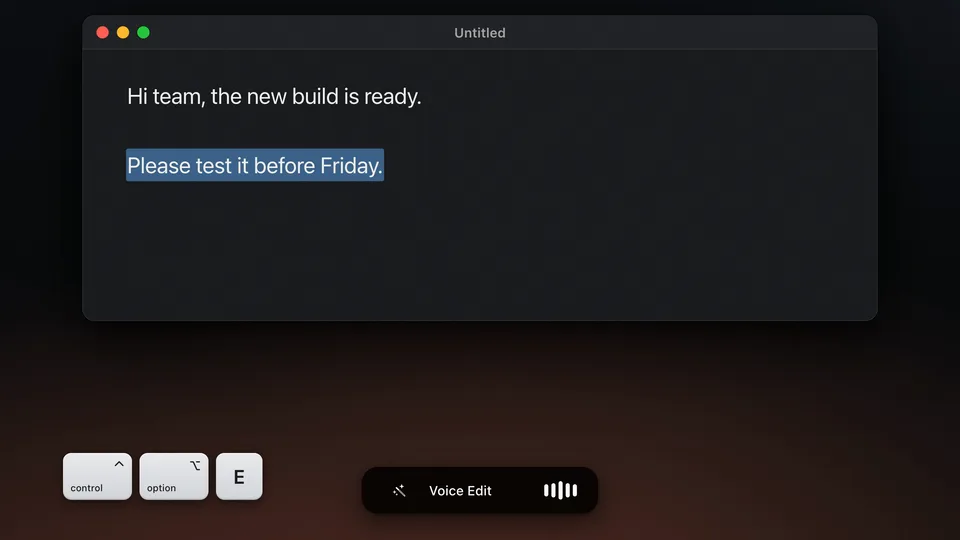
Dictation, Smart Typing, a meeting and Voice Edit in under a minute. Every line on screen is what Purr really typed.
More than dictation
All these modes are turned off until you turn them on in Settings. Like dictation, they run entirely on your Mac.
An AI notetaker with no bot in the call. Tap ⌃⌥ M to record your mic and Mac audio. Purr labels who spoke and can write a summary, in 28 languages.
Select text, hold ⌃⌥ E and say the change, like “change this week to Friday”. Apple Intelligence or Gemma rewrites it on your Mac.
Your words type into the app while you’re still talking, instead of after you let go. English, with the default Parakeet engine, and about 220 MB more.
FAQ
No. Recording, transcription, summaries and Voice Edit all run on your Mac, and there is no telemetry. Purr only goes online to download models and, if you allow it, to check GitHub for updates.
With Parakeet, the default, your words land about 0.2 seconds after you let go of the key. With Smart Typing on, they appear while you’re still talking. Whisper takes longer, and it can’t type while you talk.
English with Parakeet, the default. For other languages, switch to Whisper in Settings › Engine. It covers about 100 languages, and with the Base, Small or Large V3 model it can translate them into English. Pick the one you speak, since auto-detect can misread short clips. Smart Typing is English only, and meetings work in English and 27 more languages.
Yes. It records your mic and your Mac’s audio together, so the other people on the call are transcribed too. You’re labeled You, and they’re Speaker 1, Speaker 2 and so on. That needs macOS 14.2 or later; on 14.0 and 14.1 only your mic is recorded. When nothing plays through your Mac, like a meeting around one table, Purr tells the voices in the room apart and gives each its own Speaker label. See meeting notes on your Mac for the rest.
On notched MacBooks the icon hides behind the notch when the menu bar is crowded. Hold Command and drag to reorder, quit a few menu bar apps, or use Ice / Bartender to manage overflow. On macOS 26, also check that Purr is allowed in System Settings › Menu Bar.
Parakeet, the default, is about 450 MB and downloads during setup. The rest download only when you turn on what needs them: Smart Typing adds about 220 MB, words you add in Vocabulary about 100 MB, meetings in other languages about 630 MB, and Gemma 4 E2B, for summaries and Voice Edit, 3.35 GB. Whisper models run from about 140 MB to 950 MB. Settings › Models lists each one and can delete it.
Yes, once the models you use have downloaded. Everything runs on your Mac. Offline dictation on a Mac lists what each feature downloads.
Wispr Flow transcribes in the cloud and has apps for Windows, iPhone and Android. Superwhisper and VoiceInk can run locally too, with AI modes and more model choices, but their full versions are paid. Purr is completely free with no word limit and it’s open source with MIT license. In my side-by-side test with the same recordings, Purr put text on screen faster than Wispr Flow and Superwhisper. Coming from Wispr Flow? Here’s what changes when you switch.
Yes. Each mode has a few keys to pick from in Settings, like Right Option, F5 or ⌃⌥ Space for dictation, and dictation can also start and stop with a tap. You can’t record a key of your own yet.
Dictation works in any text field. Voice Edit reads your selection through Accessibility, which most Mac apps support. A few, like some web pages and Electron apps, don’t share it, so Voice Edit can’t see what you selected there.
The first time Purr starts after setup, it asks whether to check for updates automatically. If you say yes, it checks GitHub once a day. You can also click Check for Updates in the menu bar or in About at any time. You see what changed before anything installs, and Purr checks that each update is signed by its developer before it replaces the app.
A permission Purr needs is off, usually because it was switched off in System Settings. Click Permissions Needed to see which one and turn it back on. Updates keep your permissions.
About
I type for a living. Most days my hands are on the keyboard for nine, ten, twelve hours. A few months ago my wrists started aching partway through the afternoon, just enough that I started closing the laptop after dinner instead of finishing one more email.
I tried the usual voice to text apps. A couple of them work well. But they all wanted a monthly subscription, and they all sent my voice to a server before it came back as text. I’ve written enough software to know that, in practice, your voice sits on somebody else’s disk for as long as they feel like keeping it.
So I built Purr myself, over a few weekends that turned into a few months. It does the same job as those other apps, except everything happens right there on your laptop instead of on someone else’s server. It took a lot longer than I expected. But three months in, it’s the first thing I open every morning, ahead of Slack and email.
It’s free and open source, and your voice never leaves your Mac. It doesn’t ask for a subscription or an account, and there’s no telemetry phoning home in the background. The code is on GitHub if you want to see how it works or change something you don’t like.
I built this for myself. I’m putting it out because if your wrists ache too, you might need it more than you think.

Get the app
The QR opens the latest release and starts the download automatically. macOS 14+ on Apple Silicon.