Offline dictation
Dictation that works offline on your Mac
Purr is a free Mac app that turns your speech into text with no internet connection. After its speech model downloads once, during setup, everything happens on your Mac: dictation, meeting notes, summaries and Voice Edit. Nothing you say is uploaded.
Does the Mac’s built-in dictation work offline?
Sometimes. Apple says dictation of general text can be processed on your Mac instead of on its servers, and that Keyboard settings shows whether it is on yours. Dictating into a search box isn’t covered [1]. Purr always runs on your Mac, in any text field, and adds meeting notes and Voice Edit.
What works offline in Purr?
All of it, once the models it uses are on your Mac:
- Dictation in English with Parakeet (about 450 MB, downloaded during setup), or in about 100 languages with Whisper (140 MB to 950 MB, depending on the model).
- Smart Typing, which types while you talk. It adds about 220 MB and works in English.
- Meetings with speaker labels, in English and 27 more languages. Languages other than English add about 630 MB.
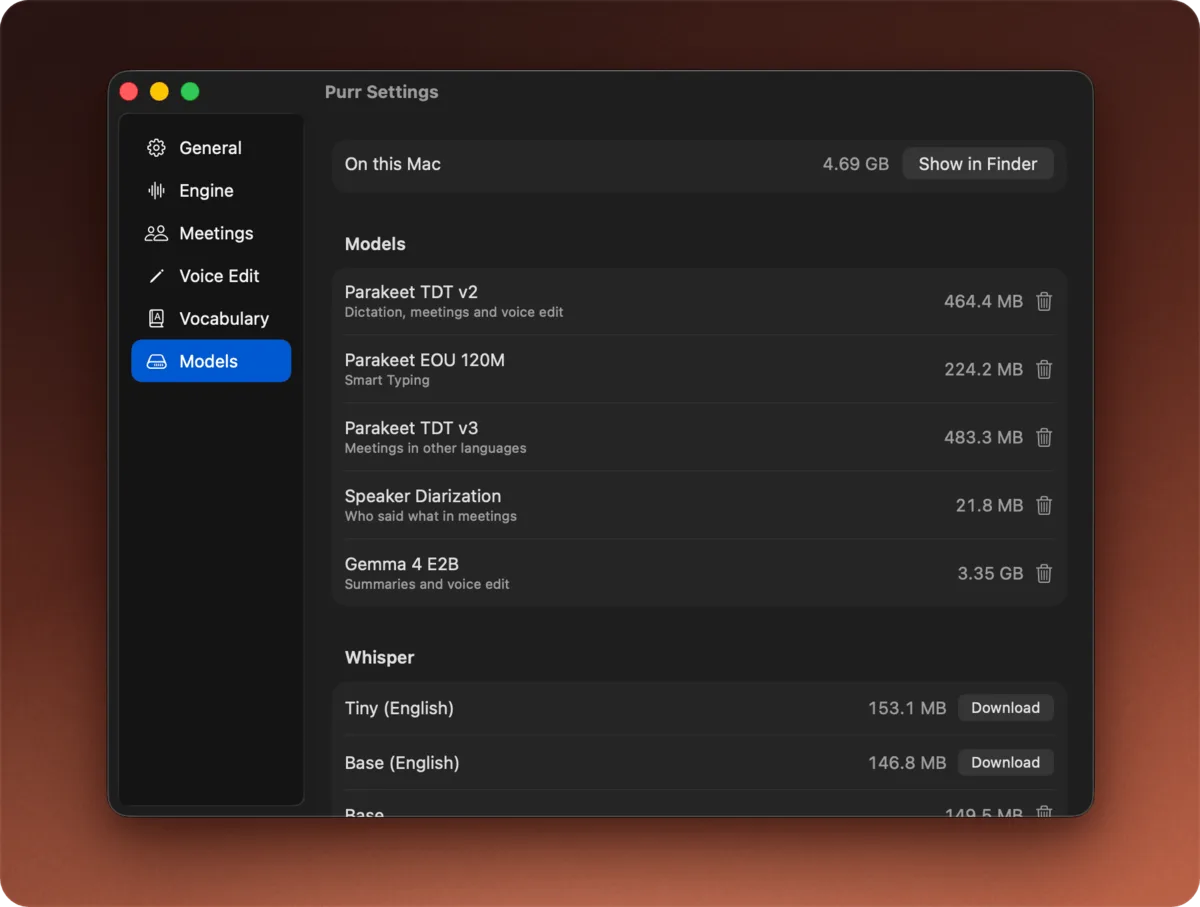
- Summaries and Voice Edit, with Apple Intelligence on macOS 26, or Gemma 4 E2B (3.35 GB) on any version.
- Names and terms you add for Purr to listen for (about 100 MB), plus fixes for misheard words and voice commands like “comma” and “scratch that”.
Each one downloads only when you turn on what needs it. Settings › Models lists them all and can delete any of them.
When does Purr go online?
Only to download models and, if you allow it, to check GitHub for updates once a day. There’s no account and no telemetry. Each update shows its release notes first, and Purr checks its signature before replacing the app.
Is offline dictation accurate?
In my tests, Parakeet, Purr’s default engine, got 3.8% of words wrong in everyday speech and 4.0% in hard audio with noise, accents and quiet speech. Wispr Flow, which runs in the cloud, scored 3.4% and 4.0% on the same recordings. Purr put the text on screen 0.22 seconds after I let go of the key. The comparison has the full results.
I also ran LibriSpeech, a standard set of audiobook recordings used to score speech models, through Purr. Parakeet got 1.88% of words wrong on the clean test set and 3.31% on the harder one, the same with or without a connection.
Which Macs does it run on?
macOS 14 (Sonoma) or later on Apple silicon, so any Mac with an M1 chip or newer. Intel Macs aren’t supported.
Common questions
Do I need internet to set it up?
Once. Setup downloads Parakeet, about 450 MB, and after that dictation needs no connection. Features you turn on later download their own models the first time.
Does Whisper work offline too?
Yes. Pick a Whisper model in Settings › Engine. It downloads once and then runs on your Mac, just like Parakeet.
Is it really free?
Yes. There’s no paid plan, no trial, no word limit and no account, and the code is MIT-licensed on GitHub.
Related
- The best free dictation apps for Mac
- Purr vs Wispr Flow, Superwhisper and VoiceInk
- A free Wispr Flow alternative that runs on your Mac
- A free Superwhisper alternative that runs on your Mac
- A free MacWhisper alternative for dictation and meetings
- Meeting notes that stay on your Mac
Sources
Spotted something out of date? Tell me and I will fix it.